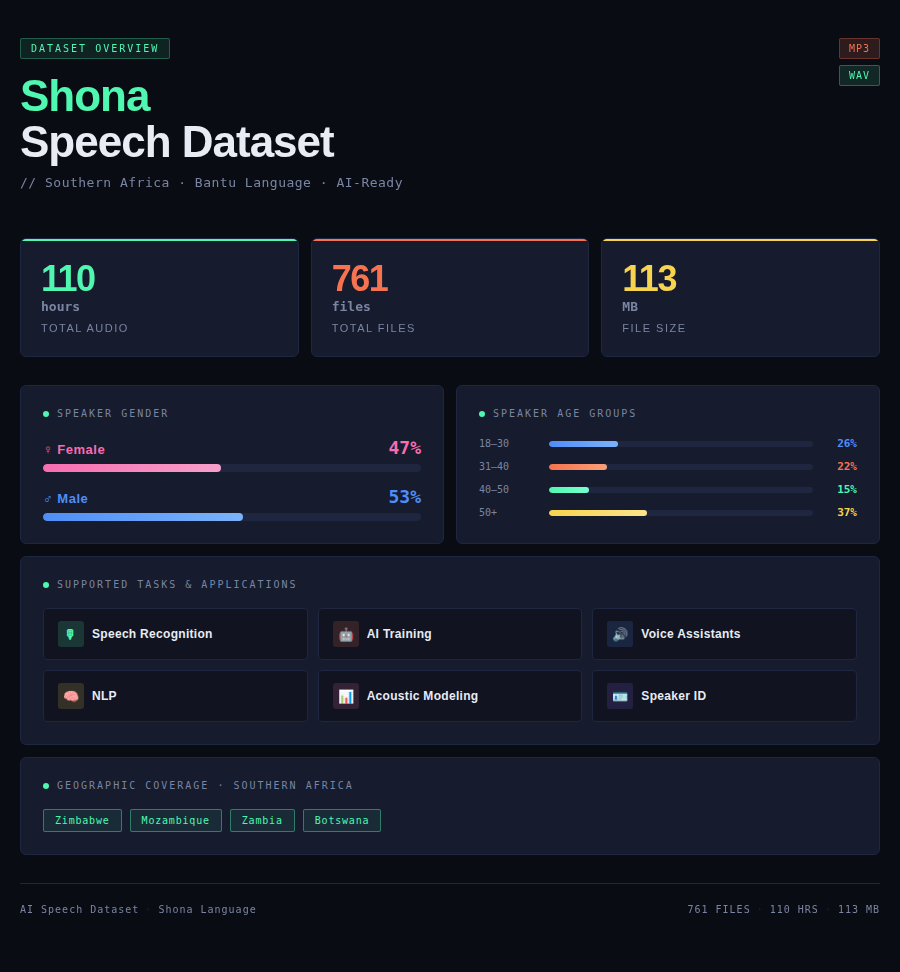
The Shona Speech Dataset offers an extensive collection of authentic audio recordings from native Shona speakers across Zimbabwe, Mozambique, Zambia, and Botswana. This specialized dataset comprises 110 hours of carefully curated Shona speech professionally recorded and annotated for advanced machine learning applications.
Shona, a Bantu language spoken by over 14 million people as Zimbabwe’s most widely spoken indigenous language, is captured with distinctive phonological features essential for developing robust speech recognition systems.
Dataset General Info
| Parameter | Details |
|---|---|
| Size | 110 hours |
| Format | MP3/WAV |
| Tasks | Speech recognition, AI training, voice assistant development, natural language processing, acoustic modeling, speaker identification |
| File size | 113 MB |
| Number of files | 761 files |
| Gender of speakers | Female: 47%, Male: 53% |
| Age of speakers | 18-30 years: 26%, 31-40 years: 22%, 40-50 years: 15%, 50+ years: 37% |
| Countries | Zimbabwe, Mozambique, Zambia, Botswana |
Use Cases
National Identity and Education
Zimbabwean educational institutions can utilize the Shona Speech Dataset to develop educational technology, literacy tools, and mother-tongue learning platforms. Voice technology supports education in Zimbabwe’s most widely spoken indigenous language, enables literacy programs for rural populations, facilitates mother-tongue education policy implementation, and strengthens Shona linguistic identity. Applications include primary education resources, adult literacy tools, examination systems, and educational content delivery in Shona.
Agricultural Extension and Rural Services
Zimbabwe’s agricultural sector can leverage this dataset to create voice-based farming advisory systems, agricultural extension services, and rural development platforms. Voice technology delivers agricultural guidance to Shona-speaking farming communities, supports food security initiatives, enables market information access, and facilitates rural economic development. Applications include crop management advice, livestock guidance, weather forecasting, market prices, and agricultural best practices delivered through voice interfaces.
Regional Media and Broadcasting
Zimbabwean media companies can employ this dataset to develop automatic transcription for Shona broadcasting, voice-enabled content platforms, and media production tools. Voice technology supports Shona language media industry, enables efficient content production, facilitates media accessibility, and strengthens Shona presence in broadcasting. Applications include radio transcription, television subtitling, podcast creation, and content discovery systems serving Shona-speaking audiences across multiple countries.
FAQ
Q: What is included in the Shona Speech Dataset?
A: The dataset includes 110 hours of audio from Shona speakers across Zimbabwe and region. Contains 761 files in MP3/WAV format totaling 113 MB with annotations.
Q: Why is Shona speech technology important?
A: Shona is Zimbabwe’s most widely spoken indigenous language with over 14 million speakers. Speech technology makes services accessible in Shona, supports linguistic rights, enables digital inclusion, and strengthens Shona cultural identity.
Q: How diverse is the speaker demographic?
A: Dataset features 47% female and 53% male speakers with ages: 26% (18-30), 22% (31-40), 15% (40-50), 37% (50+).
Q: What applications benefit from Shona technology?
A: Applications include educational technology for Zimbabwean schools, agricultural advisory systems, media production tools, government services, and platforms supporting Shona linguistic and cultural identity across multiple countries.
How to Use the Speech Dataset
Step 1: Dataset Acquisition
Download the dataset package from the provided link. Upon purchase, you will receive access credentials and download instructions via email. The dataset is delivered as a compressed archive file containing all audio files, transcriptions, and metadata. Ensure you have sufficient storage space for the complete dataset before beginning the download process. The package includes comprehensive documentation, sample code, and integration guides to help you get started quickly.
Step 2: Extract and Organize
Extract the downloaded archive to your local storage or cloud environment using standard decompression tools. The dataset follows a structured folder organization with separate directories for audio files, transcriptions, metadata, and documentation. Review the README file for detailed information about file structure, naming conventions, and data organization. Familiarize yourself with the metadata files which contain speaker demographics, recording conditions, and quality metrics essential for effective data utilization.
Step 3: Environment Setup
Install required dependencies for your chosen ML framework such as TensorFlow, PyTorch, Kaldi, or others according to your project requirements. Ensure you have necessary audio processing libraries installed including librosa for audio analysis, soundfile for file I/O, pydub for audio manipulation, and scipy for signal processing. Set up your Python environment with the provided requirements.txt file for seamless integration. Configure GPU support if available to accelerate training processes. Verify all installations by running the provided test scripts.
Step 4: Data Preprocessing
Load the audio files using the provided sample scripts which demonstrate best practices for data handling. Apply necessary preprocessing steps such as resampling to consistent sample rates, normalization to standard amplitude ranges, and feature extraction including MFCCs (Mel-frequency cepstral coefficients), spectrograms, or mel-frequency features depending on your model architecture. Use the included metadata to filter and organize data based on speaker demographics, recording quality scores, or other criteria relevant to your specific application. Consider data augmentation techniques such as time stretching, pitch shifting, or adding background noise to improve model robustness.
Step 5: Model Training
Split the dataset into training, validation, and test sets using the provided speaker-independent split recommendations to avoid data leakage and ensure proper model evaluation. Typical splits are 70-15-15 or 80-10-10 depending on dataset size. Configure your model architecture for the specific task whether speech recognition, speaker identification, emotion detection, or other applications. Select appropriate hyperparameters including learning rate, batch size, and number of epochs. Train your model using the transcriptions and audio pairs, monitoring performance metrics on the validation set. Implement early stopping to prevent overfitting. Use learning rate scheduling and regularization techniques as needed. Save model checkpoints regularly during training.
Step 6: Evaluation and Fine-tuning
Evaluate model performance on the held-out test set using standard metrics such as Word Error Rate (WER) for speech recognition, accuracy for classification tasks, or F1 scores for more nuanced evaluations. Analyze errors systematically by examining confusion matrices, identifying problematic phonemes or words, and understanding failure patterns. Iterate on model architecture, hyperparameters, or preprocessing steps based on evaluation results. Use the diverse speaker demographics in the dataset to assess model fairness and performance across different demographic groups including age, gender, and regional variations. Conduct ablation studies to understand which components contribute most to performance. Fine-tune on specific subsets if targeting particular use cases.
Step 7: Deployment
Once satisfactory performance is achieved, export your trained model to appropriate format for deployment such as ONNX, TensorFlow Lite, or PyTorch Mobile depending on target platform. Optimize model for inference through techniques like quantization, pruning, or knowledge distillation to reduce size and improve speed. Integrate the model into your application or service infrastructure whether cloud-based API, edge device, or mobile application. Implement proper error handling, logging, and monitoring systems. Set up A/B testing framework to compare model versions. Continue monitoring real-world performance through user feedback and automated metrics. Use the dataset for ongoing model updates, periodic retraining, and improvements as you gather production data and identify areas for enhancement. Establish MLOps practices for continuous model improvement and deployment.
For detailed code examples, integration guides, API documentation, troubleshooting tips, and best practices, refer to the comprehensive documentation included with the dataset. Technical support is available to assist with implementation questions and optimization strategies.